GuestLens Overview
Documentation · v5.0.0

GuestLens

Collect every photo and video your guests take. A host creates an event and prints a QR code. Guests scan it and upload from their phone browser, with no app and no sign-up. You run it on your own hosting and sell it to your customers.

GuestLens is a PHP script that you install on your own hosting. It runs a website where your customers create events, and their guests share photos and videos from their phones. You decide the prices, take the payments, and put your own name and logo on it.

How it works

  1. A host creates an eventThe host buys a plan on your site and creates an event, such as a wedding.
  2. They print the QR codeGuestLens makes a QR code and table cards for the event.
  3. Guests scan and uploadGuests open the page in their phone browser. No app and no account.
  4. The host gets everythingA live gallery, a big-screen slideshow, a guestbook, and a ZIP download.
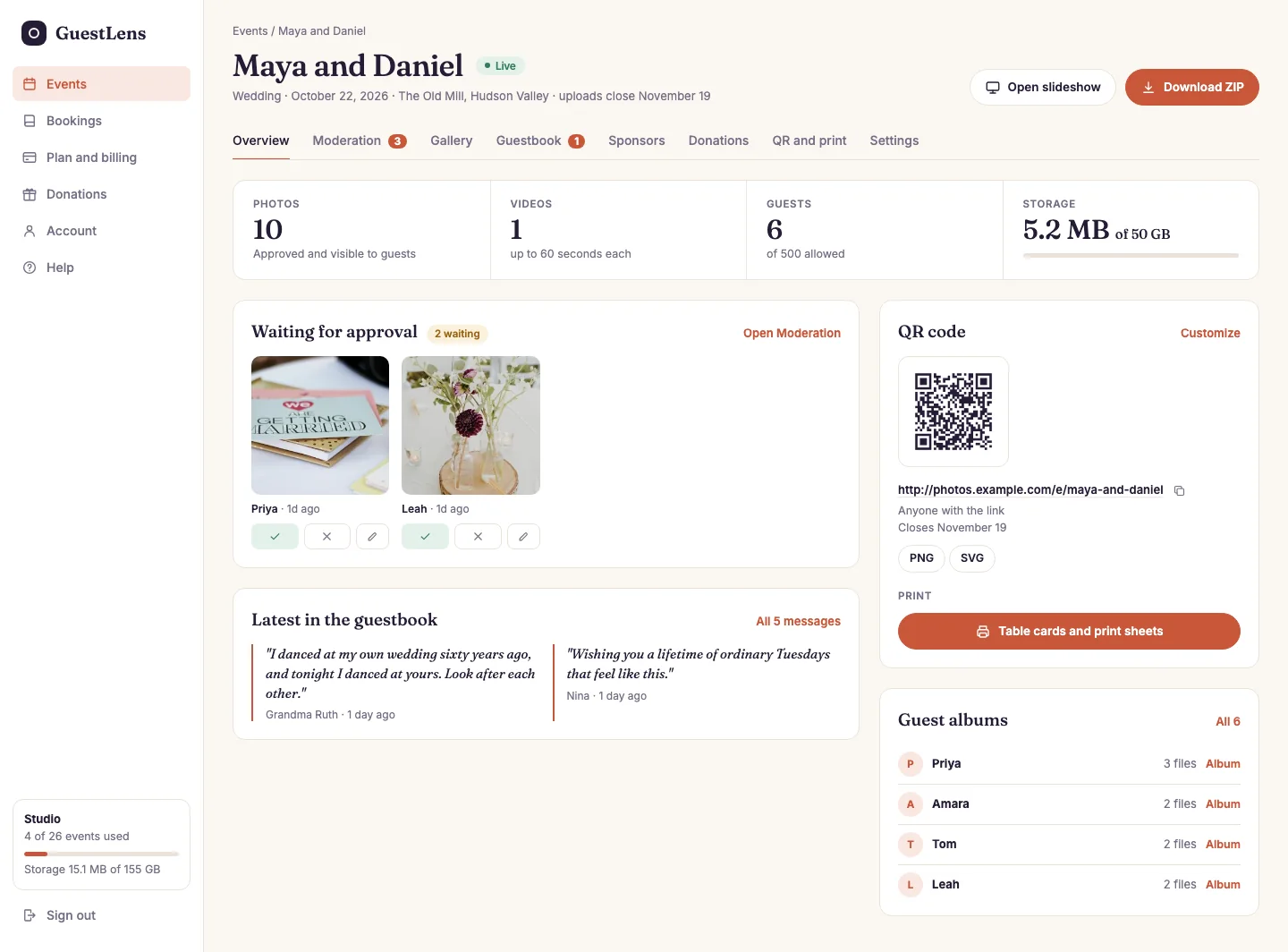
The event dashboard for Maya and Daniel, with photo and guest counts, photos waiting for approval, the QR code, the guestbook, and guest albums.
What a host sees: the dashboard of one event.
  1. Tabs for everything about the event: moderation, gallery, guestbook, sponsors, gifts, QR code, and settings. The gallery also makes the photo report, the photo book, the video, and the offline album.
  2. Counts: photos, videos, guests, and storage used.
  3. Waiting for approval: new photos the host has not checked yet.
  4. The guestbook: the latest messages from guests.
  5. The QR code and the link to the guest page.
  6. Guest albums: what each guest uploaded.
  7. Open slideshow and Download ZIP.

Three kinds of people

GuestLens has three kinds of users. Each one has their own part of the site, and they never see each other's screens. This documentation always uses these three names.

You, the buyer

/admin

You bought GuestLens and installed it, so you are the super admin. You set the plans and prices, take payments, look after your customers, and brand the site.

The host

/host

Your customer: a couple, a planner, a photographer, or a venue. They buy a plan, create events, print the QR code, approve photos, and download everything at the end.

The guest

/e/event-name

Someone at the event. They scan the QR code, upload photos and videos, and sign the guestbook. They never create an account.

A guest is remembered by a cookie that lasts one year. This is how "your uploads" works without a login. If a guest clears their cookies, GuestLens sees them as a new guest.

What you get

Browser installerInstall from your browser in a few minutes. No SSH, no command line.
Uploads that finishBig files go up in small pieces and resume after a dropped connection.
ModerationHosts approve photos, comments, and guestbook messages before guests see them.
SlideshowA full-screen show for a TV or projector that updates by itself.
QR codes and printColored QR codes, table cards, and a poster, ready to print.
GuestbookWritten messages and short voice notes, with a PDF of the book.
ZIP downloadEvery photo, video, and message in one file.
Plans and paymentsOne-time plans, paid by Stripe, PayPal, or bank transfer.
White labelYour name, logo, colors, and emails on every screen.
Eight themesWedding, birthday, baby shower, corporate, and more.
S3 and Google DriveKeep files on your server, on Amazon S3, R2, Wasabi, or Spaces, or in your own Google Drive.
Cheap hostingRuns on normal shared hosting with one cron job.
CaptionsGuests caption their photos, and hosts add notes to any of them.
Photo report PDFThe approved photos as a printable album or report, in three layouts.
Event sponsorsSponsor logos on the guest page, the slideshow, and the table cards.
Guest giftsGuests send the host money by card or PayPal, and you pay it out.
Location stampingOptional, for inspections and site visits. Only the host sees it.
BookingsHosts take bookings from their own clients, with packages, a calendar, and deposits.
Photo book PDFEach photo with the guest's name and message, ready for a print shop.
Video downloadAn MP4 slideshow of the photos and voice notes, made in the host's browser.
Offline albumOne HTML file with the photos and the guestbook that opens with no internet.
Site sponsorsYour own sponsors on all events, or on the hosts, events, or plans you pick.
Customer accessA private link for the host's customer, with only the parts the host shares.
Spam protectionBuilt-in bot checks, plus an optional Turnstile or reCAPTCHA captcha.
Host supportA Help link and an optional live chat, on host pages only.
API and Perfex CRMAn API for your own software, and a connector module for Perfex CRM.

Where to start

Read the Start here pages in order. They take you from the zip file to a working site. The first three steps take about fifteen minutes.

After that, Your first hour is a short checklist before you open the site to customers. If something goes wrong, see Troubleshooting.