 GuestLens
Run your site
Spam protection and captcha
Spam protection keeps bots away from the forms anyone can send without an account: sign in, sign up, forgot password, and the booking form. New in version 3.0. Guest pages never get a captcha, so uploading stays as fast as before.
Always on, with no setup
Two checks run on every one of those forms. They need no outside account and no JavaScript.
- A hidden field. People never see it. A bot that fills in every field fills this one too, and the form is refused.
- A timer. The form remembers when it was shown. A form sent back in under 2 seconds is refused, because no person types that fast. A page left open for more than 12 hours is shown again with a fresh timer, so a person is never locked out. It only costs one more click.
When a check refuses a form, the form comes back with what the person typed (never the password) and a short message, so they can send it again.
The captcha
For more protection, turn on a captcha in Admin, Settings, Spam protection. It is off until you pick a provider.
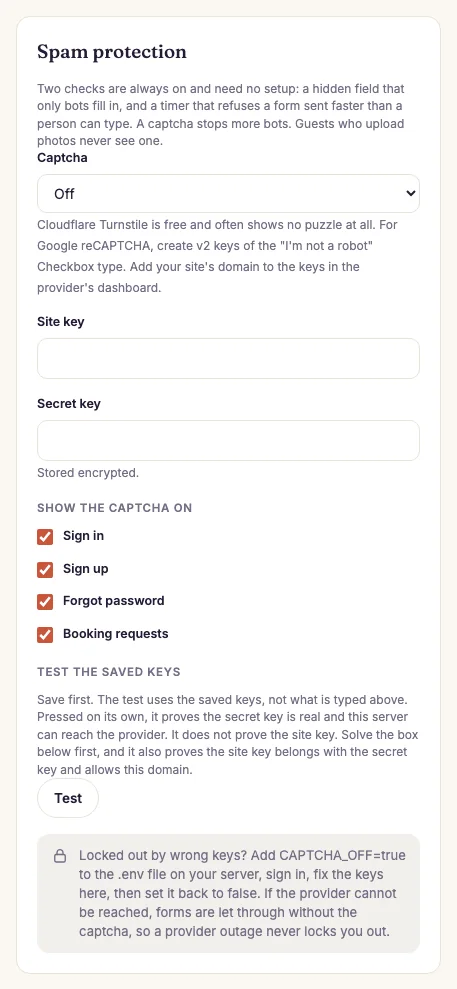
- Choose Cloudflare Turnstile (free, and most people never see a puzzle) or Google reCAPTCHA v2 (the "I'm not a robot" box).
- Make a pair of keys in the provider's dashboard. Add your site's domain there. For reCAPTCHA, pick v2, "I'm not a robot" Checkbox.
- Paste the site key and the secret key. The secret key is stored encrypted. Leave the secret box empty later to keep the saved one.
- Tick the forms that should show it: sign in, sign up, forgot password, and booking requests. All four are on by default.
- Press Save settings, then Test.
What the Test button proves
- Pressed on its own, it proves that the secret key is real and that your server can reach the provider. It says nothing about the site key.
- Solve the box on the card first, then press Test, and a pass proves that the site key and the secret key belong together and that the site key allows your domain.
When the provider cannot be reached
If your server cannot reach the provider, or the provider says your secret key is wrong, the form is let through and the reason is written to the log. This way an outage never locks you, or your hosts, out. The hidden field, the timer, and the rate limits still work. A missing or wrong answer from the person is always refused.
Locked out by a wrong key
A wrong site key means the captcha box cannot draw, so nobody can sign in, you included. To get back in:
- Open the
.envfile of your site with your hosting panel's file manager. - Add the line
CAPTCHA_OFF=trueand save the file. - Sign in. The captcha is off on every form, and the Spam protection card shows a red notice.
- Fix the keys and save.
- Remove the line from
.env, or set it tofalse.
php artisan config:cache on your server, also run
php artisan config:clear after changing .env. Most buyers never run it,
and then nothing else is needed.
On the live demo the captcha stays off, so reviewers and visitors can always sign in.