 GuestLens
Run your site
Bookings
Bookings let your hosts take bookings from their own clients. New in version 3.0. A photographer, a venue, or a planner gets a public booking page with their packages and a calendar. A client picks a package and a free day and sends a request. The host accepts or declines it, and turns an accepted booking into an event with one click.
This page is for you, the super admin. For what the host does, see Taking bookings.
Turn bookings on
Bookings need two switches, and both start off:
- The site switch: Admin, Bookings, Hosts can take bookings.
- The plan switch: Bookings, on each plan that should include it. See Plans. Sell it in your bigger plans.
A host gets a Bookings item in their sidebar when both are on and they have a paid plan that includes bookings and has not expired. A plan bought before version 3.0 does not include bookings, because the switch did not exist yet. Give that host a new plan if they should have it.
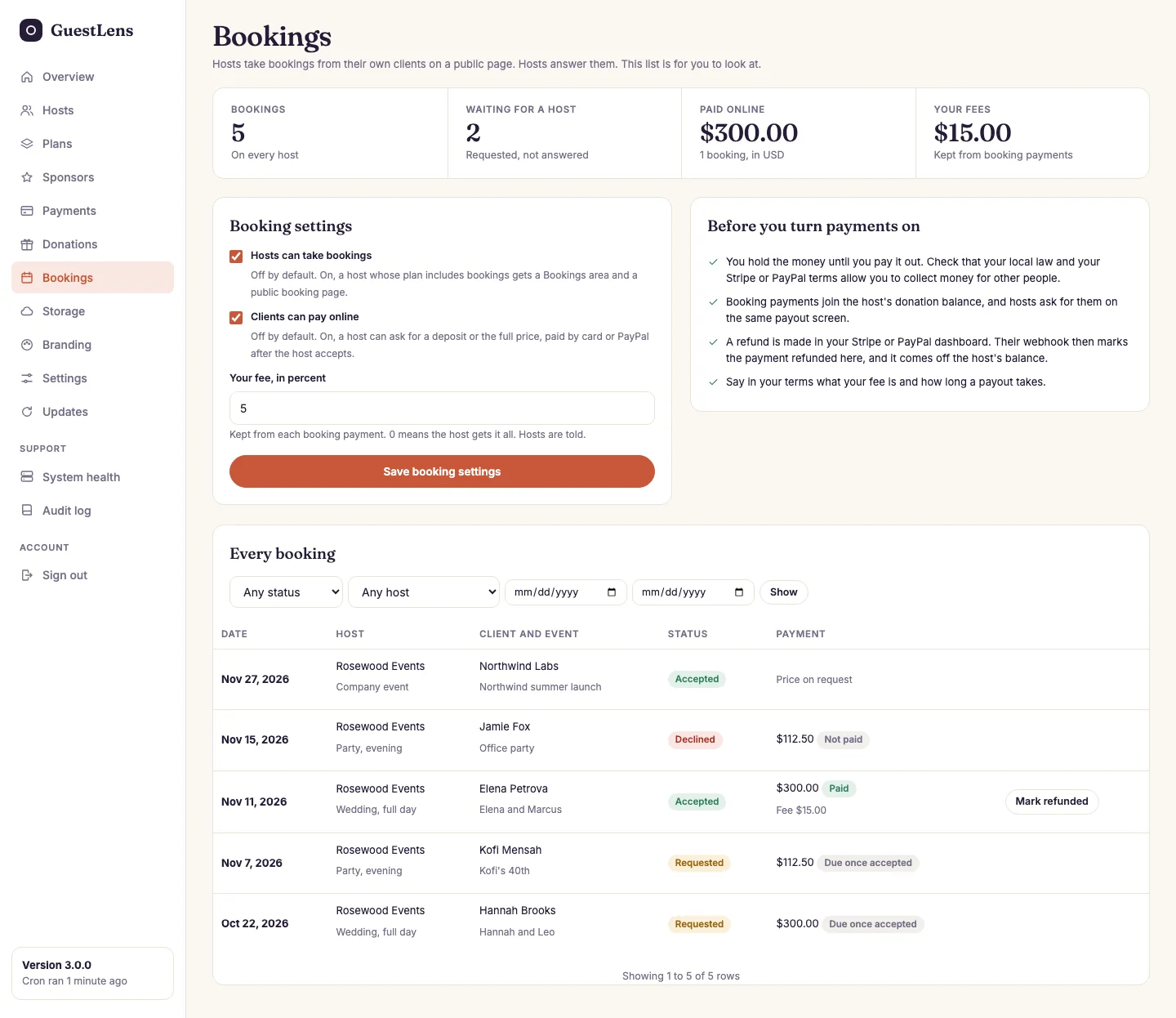
- At a glance: all bookings, the ones waiting for a host, the money paid online, and your fees.
- Booking settings: the site switch, online payment, and your fee.
- Before you turn payments on: what to check first.
- Every booking on every host, with filters for status, host, and dates. A paid booking has a Mark refunded button.
Payments
With Clients can pay online on, and Stripe or PayPal set up on the Payments screen, a host can ask for a deposit or the full price. The client pays after the host accepts, on Stripe's or PayPal's own page. A declined request never needs a refund.
- The money goes to your Stripe or PayPal account, the same as a guest donation.
- Your fee (0 by default, at most 50%) is taken off each payment. It is a separate setting from the gift fee, and hosts are told what it is.
- The rest joins the host's balance, next to their gifts. The host asks for a payout on the same screen, and you pay it the same way. See Guest donations and payouts.
- Refunds are made in your Stripe or PayPal dashboard. Their webhook marks the payment refunded and takes it off the host's balance. If the webhook was not set up, press Mark refunded here.
- One payment page at a time. A client cannot open a second payment page while the first one can still be paid, so one booking is never paid twice.
- Small amounts under 1.00 are not asked for online, because card gateways refuse very small payments.
Emails and reminders
The client and the host get an email at each step: a new request, accepted (with a calendar file), declined, canceled, paid, and done. When an event is made from a booking, the client gets the guest link and the QR code. Three days before the date, both get a reminder. The reminders are sent by the cron job, once an hour, so cron must run.
The booking form has the same spam protection as the sign-in form, and it is limited to a few requests a minute from one address.
On the live demo, bookings are on and the demo host has a booking page. Payments show a note there, and no money moves.