 GuestLens
For hosts
The event dashboard
Opening an event shows its dashboard: a summary of everything happening at the event, on one screen. Reload it to see the newest uploads. The Moderation tab updates by itself.
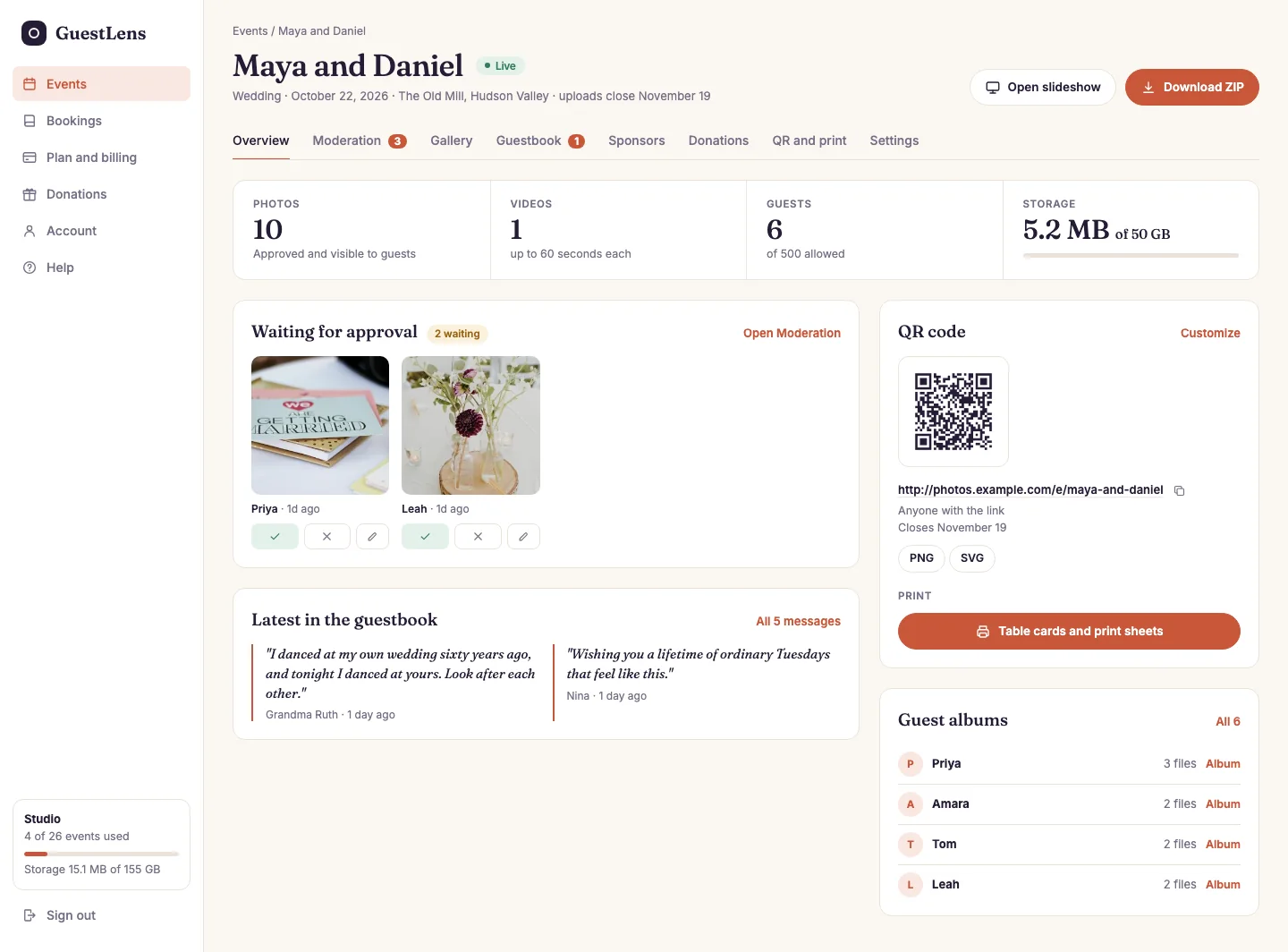
- The tabs. Moderation, Gallery, Guestbook, QR and print, and Settings. A red number means something is waiting for the host.
- The counts: approved photos, videos, guests (of the plan's limit), and storage used (of the event's limit).
- Waiting for approval: the newest photos to check. Approve or reject them right here, or open Moderation for all of them.
- Latest in the guestbook: the newest messages.
- QR code: the code, the guest link (with a copy button), who can open the page, and when uploads close. Download it as PNG or SVG, or open Table cards and print sheets.
- Guest albums: each guest who uploaded, and how many files. Album shows what they sent.
- Open slideshow for the big screen, and Download ZIP for everything. See The slideshow and Downloading everything.
When the storage meter is full, the event stops taking new files. The host can delete files they
do not want, or buy a bigger plan for their next event.