 GuestLens
For hosts
Downloading everything
At the end of the event, the host downloads everything in one ZIP file. It is the main reason many hosts pay for a service like this, so it is built to work even for very large events on small servers.
What is inside
maya-and-daniel-everything.zip
├── photos/          every photo, at the size it was uploaded
├── videos/          every video
├── voice-notes/     approved voice notes from the guestbook
├── guestbook.pdf    every approved guestbook message
├── captions.csv     the caption of each file, when any file has one
├── locations.csv    where each photo was taken, when a guest shared it
├── photo-book.pdf   the photo book, when the host ticks it
└── index.html       an album of the files, when the host ticks it
Two options on the download screen add to the ZIP: Add the photo book
(photo-book.pdf), with a page size, and Add an index.html album, which
shows the photos, videos, and guestbook from the ZIP's own folders. Unzip, then open
index.html. See The photo book and
The album inside the ZIP.
The two CSV files open in Excel, Numbers, or Google Sheets. Their first column is the file's name inside the ZIP, so each row lines up with a photo. Each file is only there when it has something in it.
Start a download
The host clicks Download ZIP at the top of any event screen. What happens next depends on the size:
- Small events (up to 500 files and 200 MB) download straight away.
- Larger events are built in the background, a few files at a time, so the server is never asked to do it all at once. The host sees this page:
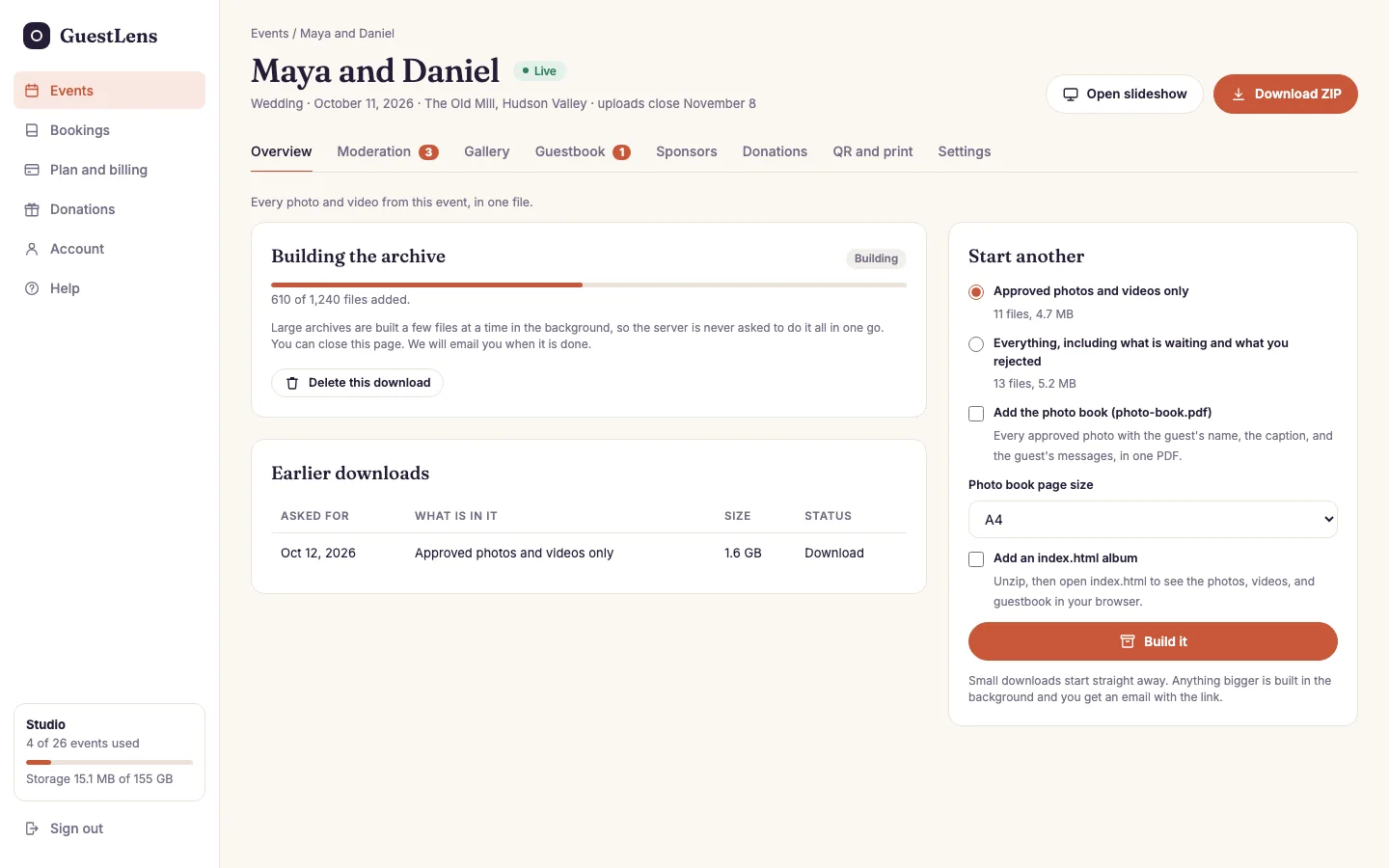
- Building the archive: how many files are in it so far. The bar moves as cron works. The host can close the page. GuestLens emails them a link when it is ready.
- Start another: choose Approved photos and videos only, or Everything, which also includes files that are waiting or were rejected.
- Earlier downloads, with a Download link while they are still ready.
A large ZIP needs cron. If the bar does not move, see The cron job.