 GuestLens
Run your site
The API
The API lets other software manage your GuestLens site: create hosts, give them plans, create events, and read upload counts. New in version 3.0. The Perfex CRM connector uses it, and you can use it from your own code. It answers in JSON.
Turn it on and make a key
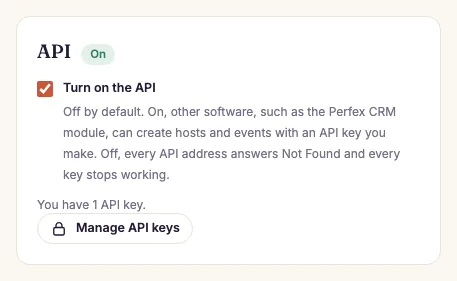
- Open Admin, Settings, tick Turn on the API, and press Save settings. While the API is off, every API address answers Not Found.
- Press Manage API keys.
- Give the key a name, such as "Perfex CRM", and choose its access:
- Read only can only read.
- Full access can also create, change, and sign in as hosts.
- Press Make the key and copy it. The key is shown only once. GuestLens keeps only a scrambled copy, so a lost key cannot be shown again. Delete it and make a new one.
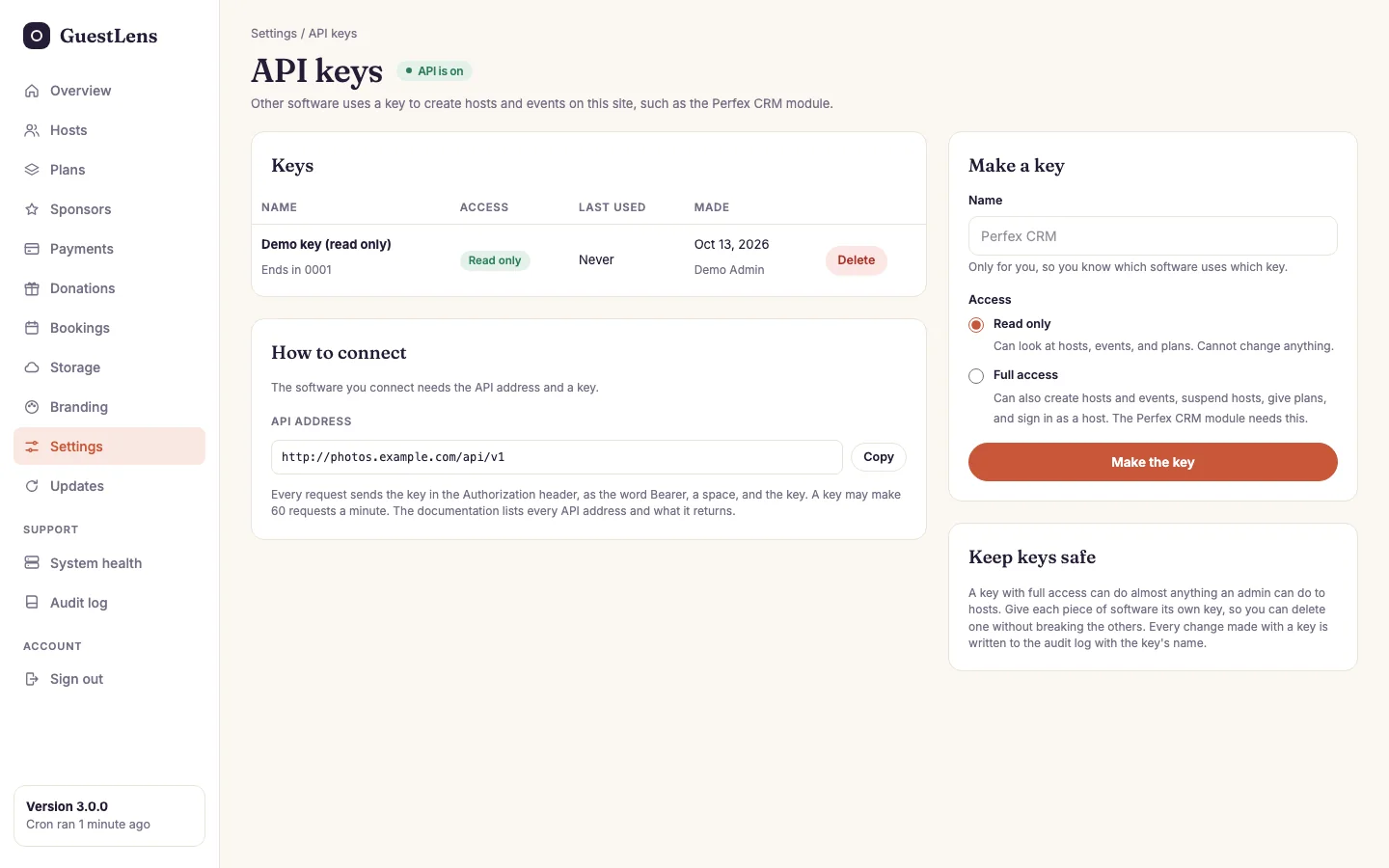
- Keys: each key's name, access, last four characters, and when it was last used, with a Delete button.
- Make a key.
- How to connect: the address and the header to send.
- Keep keys safe.
Sending requests
The address is your site with /api/v1 at the end. Send the key in the
Authorization header, as the word Bearer, a space, and the key:
curl https://photos.example.com/api/v1 \
  -H "Authorization: Bearer gl_your_key_here" \
-H "Accept: application/json"- Limits: 60 requests a minute for each key. An address that sends 10 wrong keys waits 10 minutes. Both answer
429with aRetry-Afterheader. - Errors are JSON with a plain
message. A form mistake also haserrors, with a list for each field. - Lists take
pageandper_page(up to 100). - Every change is checked and written to the audit log exactly as if you had pressed the button in the admin, with the key's name added.
What it can do
| Request | What it does |
|---|---|
GET /api/v1 | The key's name and access, the GuestLens version, and the event themes and types. Use it to test a connection. |
GET /plans | Every plan. |
GET /hosts | Hosts, newest first. Filter with search (name, email, company), email (one exact address), or status. |
POST /hosts | Create a host: name, email, password, password_confirmation, and optional company and phone. The same rules as Admin, Hosts, New host. |
GET /hosts/{id} | One host, with their event credits and number of events. |
POST /hosts/{id}/suspend and /unsuspend | The admin's Suspend button. |
POST /hosts/{id}/plans | Give a host a plan, like the admin's Give plan button. |
POST /hosts/{id}/sign-in-link | A one-time sign-in link. Optional event_id. |
GET /hosts/{id}/events | A host's events, with upload counts. |
POST /hosts/{id}/events | Create an event: name, theme, and optional type, event_date, venue. It uses one of the host's event credits, like their own form, and answers 409 when none is left. |
GET /events/{id} | One event, with the guest link, upload counts, and the QR code as a PNG in base64. qr_size sets its size, from 180 to 2000 pixels. |
The paths in the table come after /api/v1. Reading needs any key. Everything else needs a full access key.
One-time sign-in links
A sign-in link opens the host area as that host, with no password. It works once, for 60 seconds. It is refused for a suspended host and for an admin. Software that asks for one should open it in the person's browser at once, because a link preview that opens it first uses it up.
Try it on the demo
The live demo has the API on, with a read-only key you can use:
curl https://guestlens-demo.jawad.work/api/v1/hosts \
  -H "Authorization: Bearer gl_demoReadOnlyKeyForTheGuestLensDocumentation00001" \
  -H "Accept: application/json"
Changes through the API are turned off on the demo, whatever the key.